
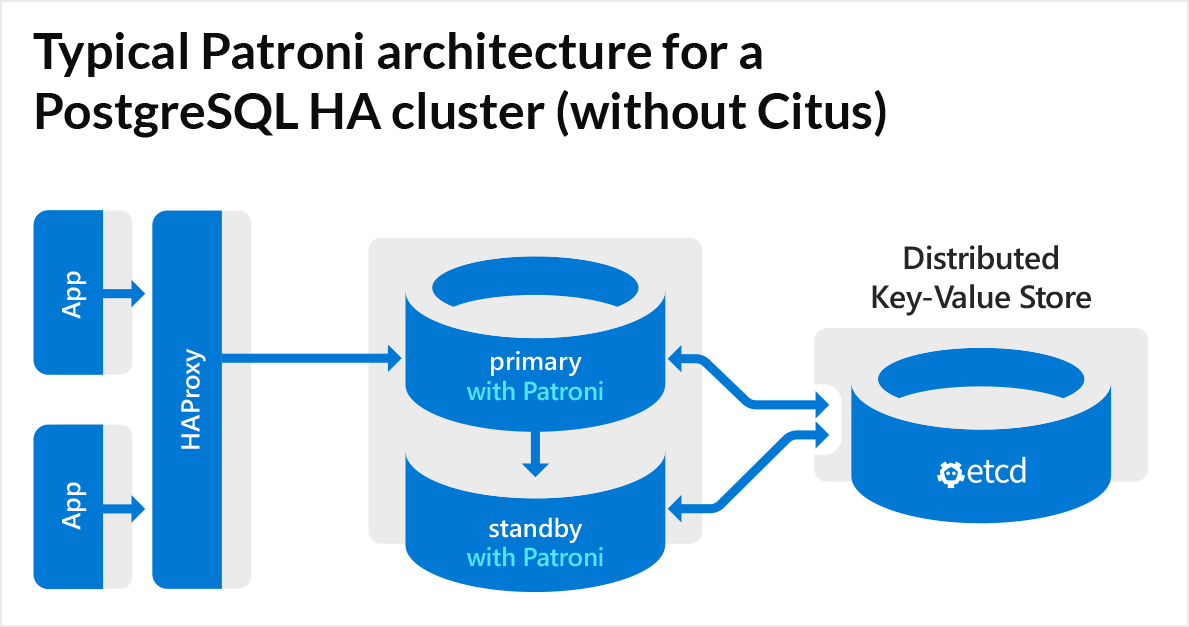
How to set up patorni high available PostgreSQL on Linux with etcd + ha proxy.
| Node1 – Patroni | Node2 – Patroni | ETCD1 | ETCD2 | HA Proxy 1 | HA Proxy 2 |
| Debian 10.10.0.181 | Debian 10.10.0.182 | Debian 10.10.0.220 | Debian 10.10.0.221 | Debian 10.10.0.216 Keepalived 10.10.0.218 | Debian 10.10.0.217 Keepalived 10.10.0.218 |
To add the latest Postgres to your server check PosgresSQL website. In my case I am adding this for Debian if you are using debian as well you can copy paste most of my commands.
sudo sh -c 'echo "deb https://apt.postgresql.org/pub/repos/apt $(lsb_release -cs)-pgdg main" > /etc/apt/sources.list.d/pgdg.list'
wget --quiet -O - https://www.postgresql.org/media/keys/ACCC4CF8.asc | sudo apt-key add -
sudo apt-get update
On the Node 1 and Node 2 install postgres:
apt-get install postgresql-16 postgresql-contrib -yStop Postgres when it’s done:
systemctl stop postgresqlCreate Symlink on both nodes: (change 16 to the latest version)
ln -s /usr/lib/postgresql/16/bin/* /usr/sbin/Install python and patroni on Node 1 and 2.
apt install python3-pip python3-dev libpq-dev -y
pip3 install --upgrade pip
pip install patroni
pip install python-etcd
pip install psycopg2
Create Configuration File for Patroni:
nano /etc/patroni.ymlThings to change:
- name: node1 < set name for your node
- listen: listen: NODE_IP_GOES_HERE:8008 set to your NODE IP!
- connect: connect_address: NODE_IP_GOES_HERE:8008 same as above set to your NODE IP!
- etcd: host: 10.10.0.184:2379 < If you are using one etcd then change the IP if you are using more etcd like i show in this guide then change it to “hosts: 10.10.0.184:2379, 10.10.0.185:2379
- Add your IP in pg_hba replication.
- Change under postgres listen and connect set same IP as the NODE IP! (your servers IP)
- Change data dir to whatever you prefer.
- Set strong password, in this case we are using md5 but you can check my other post how to change that to much stronger.
Node1 configuration:
scope: postgres
namespace: /db/
name: node1

restapi:
    listen: 10.10.0.181:8008
    connect_address: 10.10.0.181:8008
etcd:
    hosts: 10.10.0.220:2379, 10.10.0.221:2379

bootstrap:
    dcs:
        ttl: 30
        loop_wait: 10
        retry_timeout: 10
        maximum_lag_on_failover: 1048576
        postgresql:
            use_pg_rewind: true

    initdb:
    - encoding: UTF8
    - data-checksums

    pg_hba:
    - host replication replicator 127.0.0.1/32 md5
    - host replication replicator 10.10.0.181/0 md5
    - host replication replicator 10.10.0.182/0 md5
    - host all all 0.0.0.0/0 md5

    users:
        admin:
            password: admin
            options:
                - createrole
                - createdb

postgresql:
    listen: 10.10.0.181:5432
    connect_address: 10.10.0.181:5432
    data_dir: /dev/data/patroni/
    pgpass: /tmp/pgpass
    authentication:
        replication:
            username: replicator
            password: password
        superuser:
            username: postgres
            password: password
    parameters:
        unix_socket_directories: '.'

tags:
    nofailover: false
    noloadbalance: false
    clonefrom: false
    nosync: false
Node 2 Configuration
scope: postgres
namespace: /db/
name: node2

restapi:
    listen: 10.10.0.182:8008
    connect_address: 10.10.0.182:8008
etcd:
    hosts: 10.10.0.184:2379, 10.10.0.185:2379

bootstrap:
    dcs:
        ttl: 30
        loop_wait: 10
        retry_timeout: 10
        maximum_lag_on_failover: 1048576
        postgresql:
            use_pg_rewind: true

    initdb:
    - encoding: UTF8
    - data-checksums

    pg_hba:
    - host replication replicator 127.0.0.1/32 md5
    - host replication replicator 10.10.0.181/0 md5
    - host replication replicator 10.10.0.182/0 md5
    - host all all 0.0.0.0/0 md5

    users:
        admin:
            password: admin
            options:
                - createrole
                - createdb

postgresql:
    listen: 10.10.0.182:5432
    connect_address: 10.10.0.182:5432
    data_dir: /dev/data/patroni/
    pgpass: /tmp/pgpass
    authentication:
        replication:
            username: replicator
            password: password
        superuser:
            username: postgres
            password: password
    parameters:
        unix_socket_directories: '.'

tags:
    nofailover: false
    noloadbalance: false
    clonefrom: false
    nosync: false
Now create DataDir on both nodes and set file permission:
mkdir -p /dev/data/patroni/
chown postgres:postgres /dev/data/patroni/
chmod 700 /dev/data/patroni/
Create the service on both nodes so we can later start the patroni service:
nano /etc/systemd/system/patroni.service[Unit]
Description=Runners to orchestrate a high-availability PostgreSQL
After=syslog.target network.target
[Service]
Type=simple
User=postgres
Group=postgres
ExecStart=/usr/local/bin/patroni /etc/patroni.yml
KillMode=process
TimeoutSec=30
Restart=no
[Install]
WantedBy=multi-user.targetSetup ETCD on your etcd hosts, in my case I will use 2 etcd servers!
apt install etcd -ynano /etc/default/etcdETCD_NAME="CHANGE ME"
ETCD_LISTEN_PEER_URLS="http://0.0.0.0:2380"
ETCD_LISTEN_CLIENT_URLS="http://0.0.0.0:2379"
ETCD_INITIAL_ADVERTISE_PEER_URLS="http://CHANGE-ME:2380"
ETCD_INITIAL_CLUSTER="etcd1=http://CHANGE-ME:2380,etcd2=http://CHANGE-ME:2380"
ETCD_INITIAL_CLUSTER_STATE="new"
ETCD_INITIAL_CLUSTER_TOKEN="node1"
ETCD_ADVERTISE_CLIENT_URLS="http://CHANGE-ME:2379"
ETCD_ENABLE_V2="true"Set the IP to your etcd host, in the row ETCD_INITIAL_CLUSTER this is where we tell the etcd that it will work / talk in a cluster, add both hosts there for me my etcd1 has IP of 10.10.0.220:2380 for you this could be something else ETCD_INITIAL_CLUSTER="etcd1=http://ETCD-SERVER-IP-1:2380,etcd2=http://ETCD-SERVER-IP-2:2380"
etcd server 1 configuration and server 2
This is how my configuration looks like on both etcd servers:
ETCD_NAME="etcd1"
ETCD_LISTEN_PEER_URLS="http://0.0.0.0:2380"
ETCD_LISTEN_CLIENT_URLS="http://0.0.0.0:2379"
ETCD_INITIAL_ADVERTISE_PEER_URLS="http://10.10.0.220:2380"
ETCD_INITIAL_CLUSTER="etcd1=http://10.10.0.220:2380,etcd2=http://10.10.0.221:2380"
ETCD_INITIAL_CLUSTER_STATE="new"
ETCD_INITIAL_CLUSTER_TOKEN="node1"
ETCD_ADVERTISE_CLIENT_URLS="http://10.10.0.220:2379"
ETCD_ENABLE_V2="true"
Server 2:
ETCD_NAME="etcd2"
ETCD_LISTEN_PEER_URLS="http://0.0.0.0:2380"
ETCD_LISTEN_CLIENT_URLS="http://0.0.0.0:2379"
ETCD_INITIAL_ADVERTISE_PEER_URLS="http://10.10.0.221:2380"
ETCD_INITIAL_CLUSTER="etcd1=http://10.10.0.220:2380,etcd2=http://10.10.0.221:2380"
ETCD_INITIAL_CLUSTER_STATE="new"
ETCD_INITIAL_CLUSTER_TOKEN="node1"
ETCD_ADVERTISE_CLIENT_URLS="http://10.10.0.221:2379"
ETCD_ENABLE_V2="true"
Setup HA-PROXY:
apt install haproxy -y
nano /etc/haproxy/haproxy.cfg
global
maxconn 100
defaults
log global
mode tcp
retries 2
timeout client 30m
timeout connect 4s
timeout server 30m
timeout check 5s
listen stats
mode http
bind *:7000
stats enable
stats uri /
frontend patroni-prod
mode tcp
maxconn 5000
bind *:5432
default_backend patroni_servers
backend patroni_servers
mode tcp
option httpchk OPTIONS /leader
http-check expect status 200
default-server inter 3s fall 3 rise 2 on-marked-down shutdown-sessions
server node1 10.10.0.181:5432 maxconn 100 check port 8008
server node2 10.10.0.182:5432 maxconn 100 check port 8008
listen postgres
bind *:5000
option httpchk
http-check expect status 200
default-server inter 3s fall 3 rise 2 on-marked-down shutdown-sessions
server node1 10.10.0.181:5432 maxconn 100 check port 8008
server node2 10.10.0.182:5432 maxconn 100 check port 8008To setup HA on HAProxy you need to have 2 HA proxy servers that points to same backend
Use same configuration file on both servers:
global
    maxconn 100

defaults
    log global
    mode tcp
    retries 2
    timeout client 30m
    timeout connect 4s
    timeout server 30m
    timeout check 5s

listen stats
    mode http
    bind *:7000
    stats enable
    stats uri /

frontend patroni-prod
        mode tcp
        maxconn 5000
        bind *:5432
        default_backend patroni_servers


backend patroni_servers
        mode tcp
        option httpchk OPTIONS /leader
        http-check expect status 200
        default-server inter 3s fall 3 rise 2 on-marked-down shutdown-sessions

        server node1 10.10.0.181:5432 maxconn 100 check port 8008
        server node2 10.10.0.182:5432 maxconn 100 check port 8008

listen postgres
    bind *:5000
    option httpchk
    http-check expect status 200
    default-server inter 3s fall 3 rise 2 on-marked-down shutdown-sessions
    server node1 10.10.0.181:5432 maxconn 100 check port 8008
server node2 10.10.0.182:5432 maxconn 100 check port 8008Now install Keepalived on both servers (proxys)
apt install keepalived
nano /etc/keepalived/keepalived.conf
Add the following to the keepalived.conf on the ha proxy server 1 and on the other server change the STATE to SLAVE Make sure you pick a free IP for the virtual IP!
Make sure to exclude this IP from the dhcp pool, dhcp will still think that this is a free IP and could easily assign it to a device. Virtual IP or as some cloud providers calls it floating IP is supposed to float between those two HA proxys!
vrrp_script chk_haproxy {
    script "/usr/bin/killall -0 haproxy"
    interval 2
    weight 2
}

vrrp_instance VI_1 {
    interface eth0
    virtual_router_id 51


    state MASTER
    priority 102

    virtual_ipaddress {
      10.10.0.218
  }
  track_script {
    chk_haproxy
  }
}
HA PROXY NODE 2
vrrp_script chk_haproxy {
    script "/usr/bin/killall -0 haproxy"
    interval 2
    weight 2
}

vrrp_instance VI_1 {
    interface eth0
    virtual_router_id 51


    state SLAVE
    priority 101

    virtual_ipaddress {
      10.10.0.218
  }
  track_script {
    chk_haproxy
  }
}
After adding the configuration to both severs start the keepalived service and check the status.
systemctl start keepalived
systemctl status keepalived
The “MASTER” server HA proxy 1 should get 1 extra IP, the his the virtual IP that keepalived will use, to check that run “ip a” on the master ha proxy sevrer. The result should be somthing like this:
2: eth0:  mtu 1500 qdisc pfifo_fast state UP group default qlen 1000
    link/ether 0e:fd:d7:5e:26:da brd ff:ff:ff:ff:ff:ff
    altname enp0s18
    altname ens18
    inet 10.10.0.217/24 brd 10.10.0.255 scope global dynamic eth0
       valid_lft 84885sec preferred_lft 84885sec
    inet 10.10.0.218/32 scope global eth0   < THIS IS MY VIRTUAL IP I ADDED IN THE CONFIG!
       valid_lft forever preferred_lft forever
    inet6 fe80::cfd:d7ff:fe5e:26da/64 scope link
       valid_lft forever preferred_lft forever
Now when you try to access the HA proxy you will use the Virtual IP that IP will always point to the master HA proxy and manage the failover in case master dies the slave will take over as a master role. In my case I would use 10.10.0.218 to access the Patroni cluster!
psql -h 10.10.0.218 -U postgresEnable Patroni service if everything is OK
Run on both nodes to make sure Patroni service starts if the server reboots.
systemctl enable patroni.serviceTroubleshooting:
If you receive error that your patroni can’t talk to etcd this is ussaly because of the dns, add dns records or add the hosts manually in /etc/hosts
On node 1 and node 2
nano /etc/hosts10.10.0.220 etcd1
10.10.0.221 etcd2You can now test ping etcd1 and the name should resolve to the IP. You can also change in the patroni.yml from IP to dns name in the etcd hosts:
From: hosts: 10.10.0.220:2379, 10.10.0.221:2379
To: hosts: etcd1:2379, etcd2:2379
Restart the patroni service and check the status again.
Useful commands for Patroni:
patronictl -c /etc/patroni.yml list
Cluster: postgres (7294370029723403248) -----+----+-----------+
| Member | Host | Role | State | TL | Lag in MB |
+----------+-------------+---------+-----------+----+-----------+
| node1 | 10.10.0.181 | Leader | running | 2 | |
| node2 | 10.10.0.182 | Replica | streaming | 2 | 0 |
+----------+-------------+---------+-----------+----+-----------+
This shows the status of the cluster and who is the leader.
To force switchover run:
patronictl -c /etc/patroni.yml switchoverTo create exact same setup you could use Digital Ocean for that, signing up with my referral link will give you 200$ for free to try out the platform!
Click on the box below to use my referral link or click here

Your Site is very nice, and it’s very helping us this post is unique and interesting, thank you for sharing this awesome information. and visit our blog site also.